 Poster Printer
Ten pages wide, or one Paper
A continuous slider from a single sheet to a ten-page-wide mural, with the page count and the real finished dimensions updating as you move it.
Mural dimensions. Letter-size paper.
The photo on your phone is already big enough for a mural. It’s the printer that thinks in letter paper. Poster Printer does the division — it slices your image across as many sheets as the wall needs, prints a label on every seam, and sends the lot to the printer in the next room.
$0.99, once iPhone & iPad Requires iOS/iPadOS 26.2+ No ads No tracking All on-device Frame optional
01 — Why
Van Gogh painted The Starry Night a little over three feet across. It hangs behind glass in New York, and the print you can buy of it is the size of a place mat.
Meanwhile you own a printer. It cost less than the framing would, it takes paper by the ream, and it can produce a sheet every four seconds all afternoon. What it cannot do is work out which twenty-fourth of the canvas goes on which sheet.
That is the only real barrier between a file and a gallery wall: the arithmetic, and the quiet moment of despair two hours later when you are holding twenty-four identical-looking sheets and wondering which one is row three, column two.
1 photo → 24 sheets Poster Printer does the arithmetic and prints the answers onto the pages themselves. You supply the wall.
02 — How it works
No project file, no export settings, nothing to sign into. Choose a photo and you are three taps from paper.
Anything in your library. If it is short of pixels for the size you are asking, the engine sharpens and upscales it rather than handing you a grid of visible squares.
Drag from a single sheet up to ten pages wide, and watch the page count and the finished dimensions change as you go. Or skip the dragging and type the measurement you actually need — inches, feet, centimeters or meters.
Push the saturation, pull the contrast, or map the whole image onto two colors of your choosing for a flat pop-art print. Toggle Ink Saver and the whole thing goes to halftone dots.
AirPrint straight from the phone, or save the tiled document as a PDF for a printer somewhere else. Every sheet carries its row and column, printed inside the overlap where the finished poster hides it.
03 — Screens
Seven screens from the app. The core flow first, then everything else it can do.
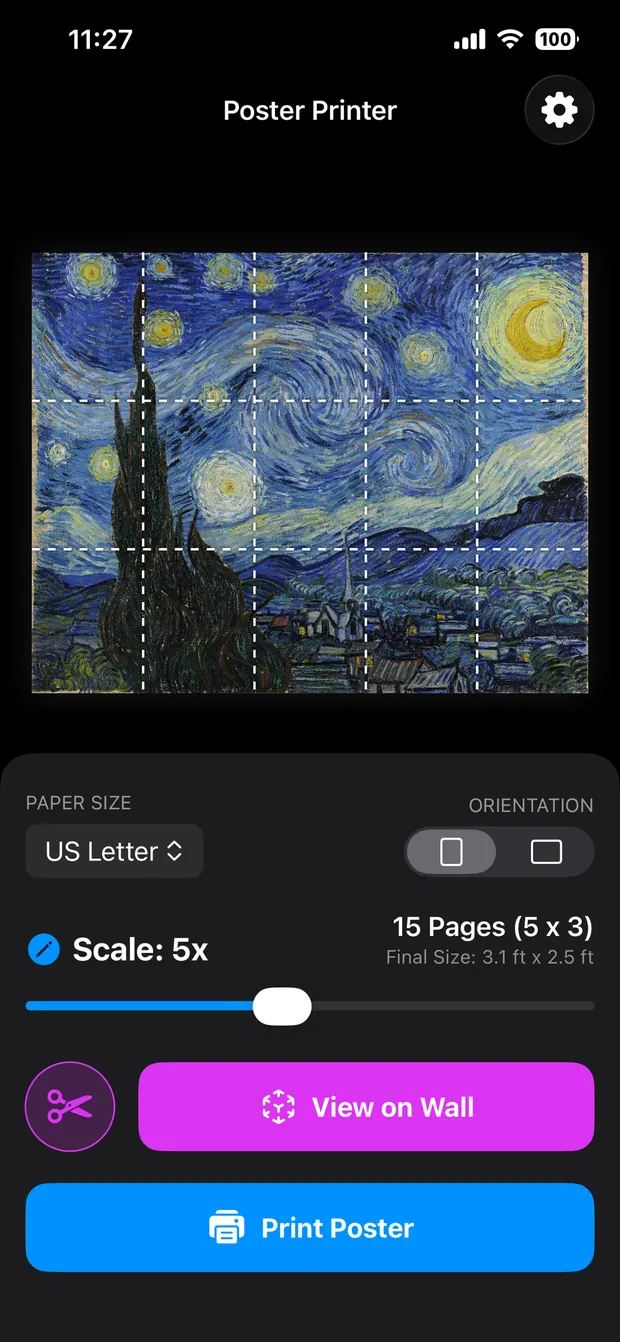
Paper size, orientation, scale. The page count and the finished dimensions sit beside the slider and change as you drag it, so the size is a decision rather than a surprise.
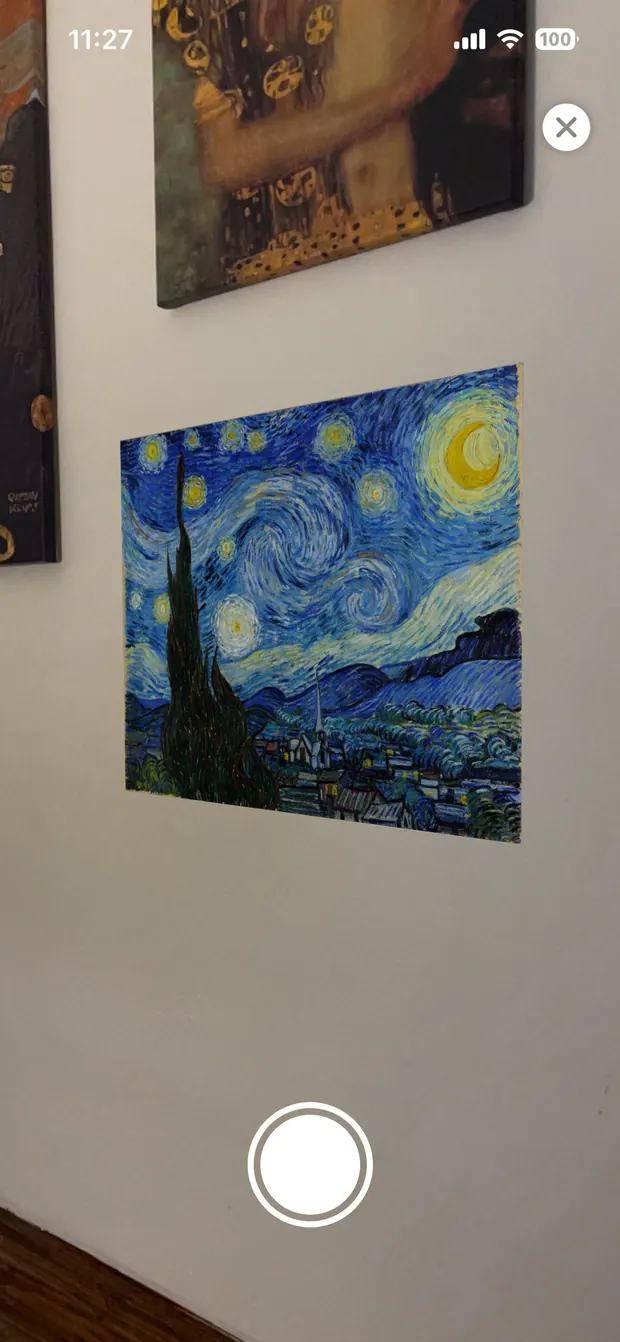
View on Wall puts the finished poster into your actual room at true 1:1 through ARKit. Hang it beside the art you already own and the size argument settles itself.
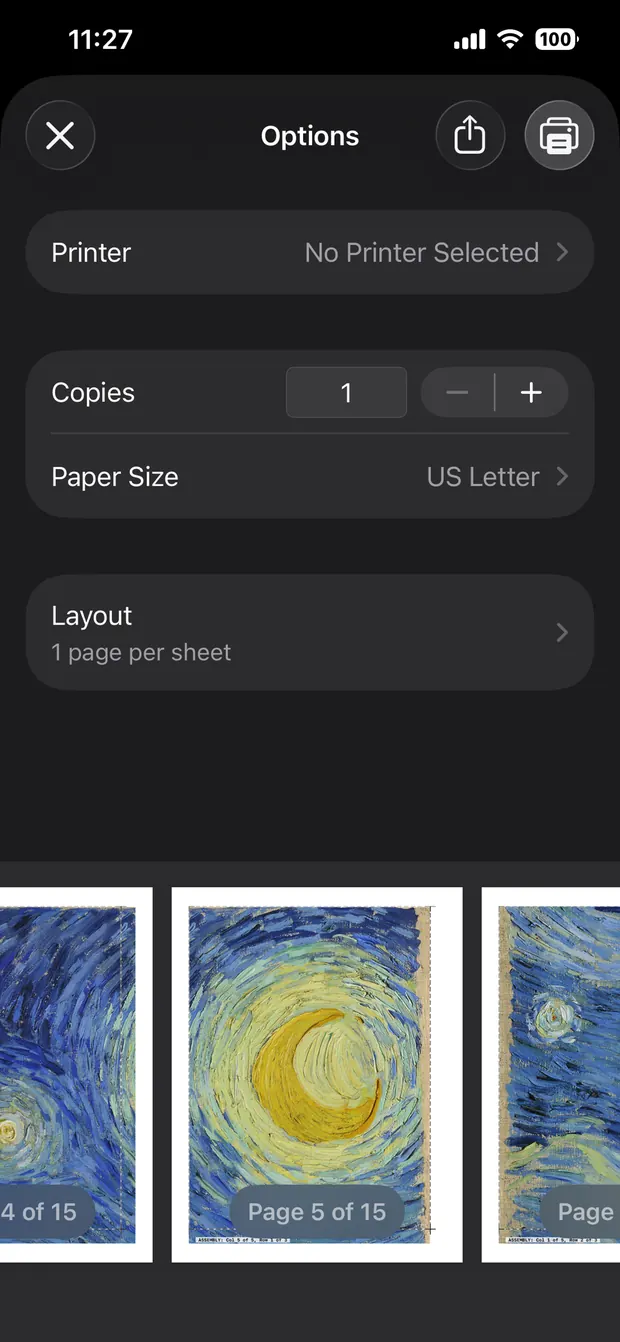
Any AirPrint printer, straight from iOS, no desktop step in the middle. Or save the whole tiled document as a PDF and print it somewhere with more ink.
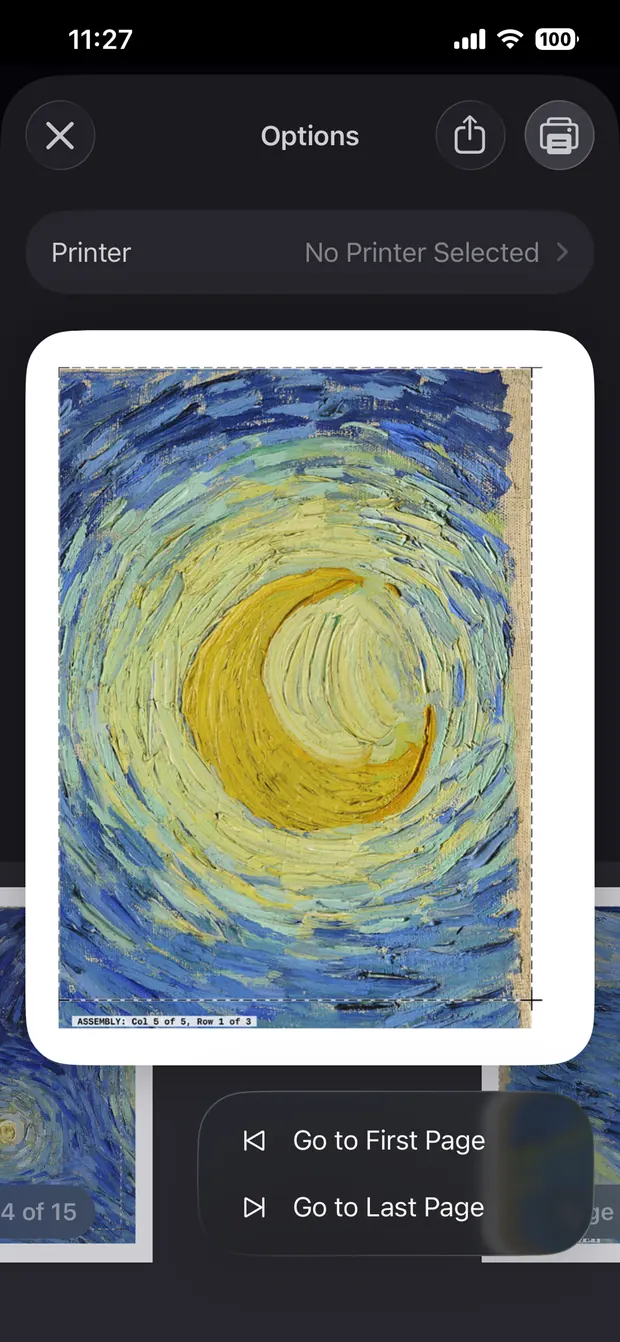
A dashed line to trim along, and a label printed into the overlap: Col 5 of 5, Row 1 of 3. Drop the stack on the way to the table and you can still rebuild it — and once the next sheet is taped down, the label is underneath it.
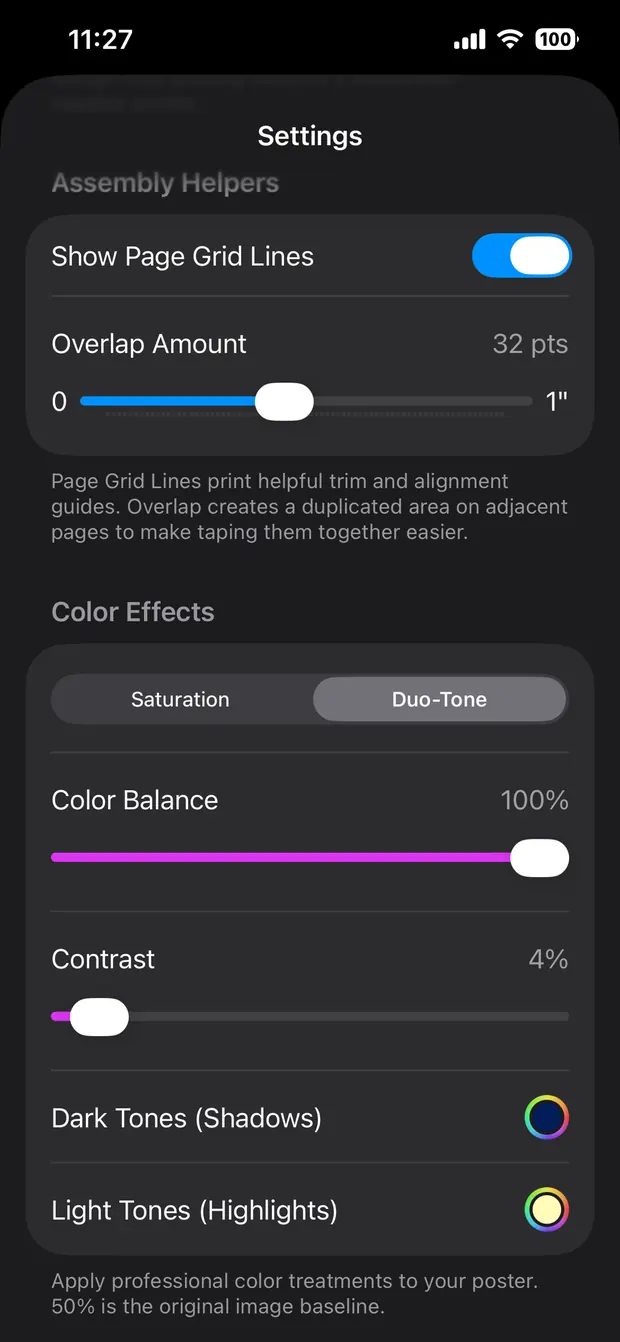
Map the shadows and the highlights onto any two colors you like and a photograph becomes a flat, graphic print. Saturation and contrast sit in the same panel for when you want the picture to stay a picture.
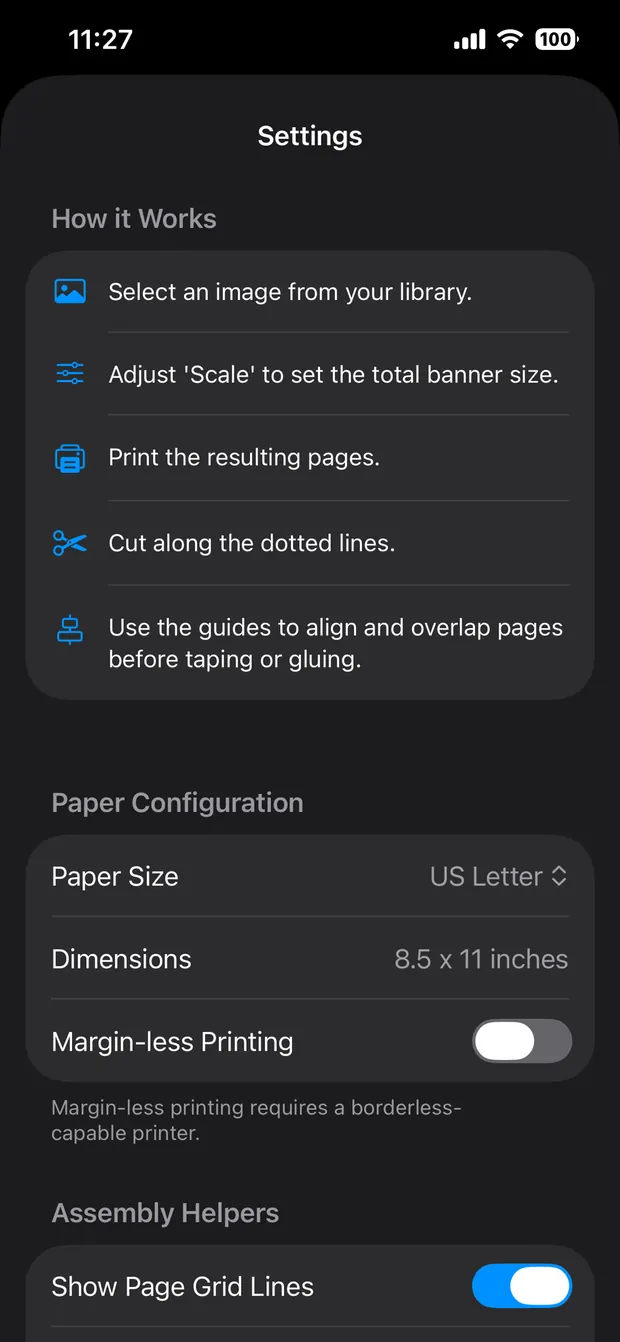
US Letter, Legal, Tabloid, Executive and Half Letter; A3, A4 and A5; B4 and B5. Margin-less printing for borderless photo printers, and grid lines you can switch off once you trust it.
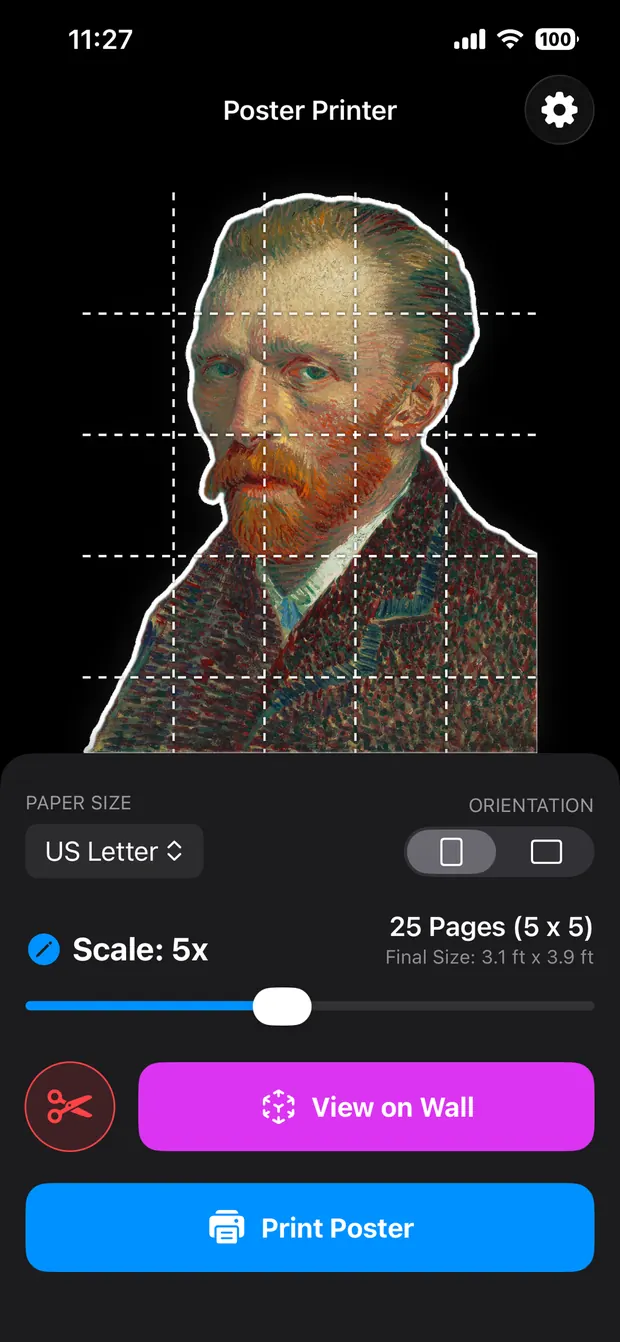
Switch on Standee Mode and the on-device AI lifts the subject off its background, crops the layout in to save paper, and draws a dotted line to cut along.
Scroll sideways →
04 — Features
The tiling is the easy half. Most of this app exists because a poster made of twenty-four separate sheets fails in twenty-four specific ways, and every one of them has to be handled before you reach for the tape.
A continuous slider from a single sheet to a ten-page-wide mural, with the page count and the real finished dimensions updating as you move it.
You know the wall is 48 inches. Type that and the app solves for the scale — in inches, feet, centimeters or meters, whichever way you think about walls.
US Letter, Legal, Tabloid (11×17), Executive and Half Letter; A3, A4 and A5; B4 and B5. Plus a margin-less toggle for borderless photo printers, so you never have to trim a millimeter of white border if your hardware can avoid it.
Each sheet gets its row and column stamped inside the overlap — the part you glue and the next page covers. Foolproof to assemble, invisible once it is up.
The dotted cut lines and glue tabs are drawn as vectors, not pixels, so they print crisp at any scale on any printer. Trimming is hard enough without chasing a fuzzy line.
Blow a phone snapshot up to five feet and it will go soft. High-quality filtering and sharpening are applied automatically so it goes soft rather than blocky, which is the difference between a poster and a mistake.
Map the shadows to one hue and the highlights to another, and high-resolution photography turns into flat, punchy graphic art. Print a concert poster or a pop-art portrait in two colors of your own choosing, without leaving the app.
Push the color or pull it back before anything is committed to paper, rather than editing elsewhere and re-importing. The preview is the poster.
A twenty-four-sheet mural at full coverage will drain your cyan before lunchtime, and this is a very blue painting. Ink Saver lays a sharp CMYK halftone across the image — it reads as deliberate, vintage risograph printmaking, and it leaves your cartridges alive.
View on Wall places the finished poster in your actual space at true 1:1 through ARKit. Check the proportions against the real framed art you already own before anything goes to press. Tap the shutter for a photo, hold it to record a video.
Need a subject to break out of the rectangular frame? Standee Mode uses on-device AI to drop the background and hug the subject tight, then crops the layout to its bounds automatically — so you are not spending six sheets of ink printing empty air.
Set how much padding sits around the subject and whether the border prints white or black, with a dotted cut line so the trimming is obvious.
Background removal, tiling, scaling and color work all run locally. HoneyWired operates no server for this app and holds no account for you — there is no upload step to opt out of, because there is no upload.
No third-party trackers, no advertising libraries, no usage telemetry. One purchase, and then the app is simply a tool you own.
05 — Pricing
One purchase, every feature, on every iPhone and iPad signed into your account. No subscription, no unlock tier, no credits for the AI, no ad you sit through to remove a watermark. There isn’t a watermark.
The paper and the ink are between you and your printer.
$0.99 once
US price · iPhone and iPad
06 — FAQ
One purchase — $0.99 in the US, the local equivalent elsewhere. No in-app purchases, no subscription, no ads. Every feature on this page is in the app the moment you download it.
They share an engine and split the job. Poster Printer is the poster: it has the color work — duo-tone, saturation, contrast — and exact-dimension scaling for when the wall is a known size. Standee mode is here too, and it is good, but it is the second thing this app does.
Cardboard Cutout is the standee. It adds the things a free-standing cutout needs and a wall poster does not: a physics pass that generates a flat, balanced base so the thing stands up, AI speech and thought bubbles anchored to the face, and any border color you can name rather than white or black.
If you are printing something to hang, buy this one. If you are printing a person to stand in a room, buy that one. They are ninety-nine cents each, so this is not an agonizing decision.
iPhone and iPad, running iOS or iPadOS 26.2 or later. One purchase covers both.
Ten pages wide, with the height following your image’s aspect ratio. On US Letter that works out around seven feet across; on Tabloid or A3, closer to nine. The demo on this page stops at twenty-four sheets and three and a half feet, which is already wider than the painting it is copying.
Past that, the limiting factor stops being the app and starts being whether you own that much uninterrupted drywall.
Turning a photograph into a graphic. Instead of printing every color in the image, the app maps the dark parts to one color and the light parts to another — the look of a two-color silkscreen gig poster. It is also gentler on ink than a full-color print, for the obvious reason.
Saturation and contrast sit next to it for when you want the photo to stay a photo and just need it a little louder on paper than it looked on screen.
A large poster at full coverage uses a lot, yes. That is what Ink Saver is for: a CMYK halftone dot screen across the image that keeps the colors and the subject readable on far less ink. Up close it looks like newsprint. From across the room, which is where a mural is looked at, it looks like the photo.
Duo-tone helps too, since it is only laying down two colors instead of four.
Ordinary office paper is fine for a wall poster, though card stock holds up better and will not show the tape through from behind.
For a standee, card stock is the minimum, and paper alone will not stand up. Glue the assembled piece to foam core board or corrugated cardboard, cut around the line, and tape a triangle of the same board to the back as a kickstand.
Every page prints with a dotted cut line and an overlap area beyond it. Trim along the dotted line with scissors or a craft knife, apply tape or glue to the overlap, and lay the next sheet on top.
The overlap on each page carries a small printed label — Col 2 of 5, Row 2 of 5 — so a dropped stack is an annoyance rather than a disaster. Once the next sheet is down, the label is underneath it.
At the smaller end, yes. Tape the seams on the back — archival tape if you care about how it looks in ten years — and a poster that lands near 24 by 36 inches drops straight into an off-the-shelf frame, with nobody the wiser about the office inkjet it came out of.
At the larger end you are past anything sold ready-made. A seven-foot mural goes up unframed, or into something built for it. Mounting the whole sheet on foam core first keeps it flat and makes it far easier to handle.
No. Any inkjet or laser printer that supports AirPrint will print directly from the phone. If yours does not, save the tiled document as a PDF through the iOS print dialog and print it from a computer, or take it to a copy shop.
Borderless photo printers get one extra option: a margin-less toggle that removes the white edge from every sheet.
Yes, and the big collections make it easy — a great many museums publish their out-of-copyright works at full resolution, free. Those files arrive enormous, which is exactly what you want when you are covering a wall with them.
One honest note on the arithmetic: the ninety-nine cents buys the app. The ink is between you and your printer, and a twenty-four-sheet mural is not a ninety-nine-cent afternoon. That is what Ink Saver mode is for.
Less terrible than you would expect. The app applies high-quality resampling and sharpening as it tiles, so an image short of pixels goes gently soft rather than turning into visible squares. A phone photo taken in decent light will make a convincing six-foot poster; a screenshot of a screenshot will not.
No. Background removal, tiling, scaling, color work and halftoning all run locally on your device. HoneyWired runs no server for this app, holds no account for you, and has no analytics or advertising code in it.
07 — Privacy & Legal
Poster Printer is built to work with no network connection at all. That is not a privacy feature bolted on afterwards — it is how the app is put together.
Last updated: March 10, 2026
Background removal for Standee Mode runs entirely on your device through Apple’s local Vision framework, as does every tiling, scaling and color operation. Your photos are never collected, transmitted, or uploaded.
We do not collect, store, share, or transmit your personal data, your photos, or any record of how you use the app.
The app asks for Photo Library access for two reasons: to let you choose an image to print, and to save snapshots and videos you capture in View on Wall back to your camera roll. We cannot see your library, remotely or otherwise.
View on Wall needs the camera to run the augmented reality session and find your wall or floor. The camera feed is not recorded or transmitted; it is drawn on your screen and discarded.
There are no third-party analytics, tracking pixels, crash-reporting services, or advertising SDKs in this app.
Found a bug, hit a printer that will not cooperate, or want something the app does not do yet?
Email support@honeywired.com and you will get a reply from the developer, not a ticket number.
It helps to mention your device and iOS version, the printer and paper size you were using, and what happened.
Poster Printer is a paid application. Buying it grants you a non-exclusive license to use it on the iPhones and iPads signed into your account, for as long as you like. There are no advertisements and no further in-app purchases required to unlock anything.
You are responsible for the content you choose to print. HoneyWired LLC makes no claim about, and takes no responsibility for, the copyright status of images you process with this tool.
The app is provided “as is”. We support standard AirPrint devices, but cannot guarantee behavior on every printer model, driver, or paper handling quirk in existence.
This application is licensed under the standard Apple End User License Agreement. By downloading it, you agree to the Apple Standard EULA.
HoneyWired LLC reserves all rights not expressly granted to you.